Showing posts with label archos 5. Show all posts

Monday, November 17, 2008

Archos 5

Well, I finally got it... or maybe I should say that I've already got it. I hadn't planned on getting it for another 2 weeks, but I got too excited to wait, and bought it yesterday. And now it seems like a good decision, but not for good reasons. I'm going to have to exchange my lovely Archos 5 250 GB for another one... maybe the power going out just as the clerk rung it in was an omen... well it was a foretelling of what was to come anyways.

I brought the Archos home (to my dad's that is), opened it up, and plugged it into the wall. Now if you know the Archos 5, you'll know it doesn't come with a wall charger. I just went to The Source and bought a little USB wall charger for $5, and it did charge it in less than 8 hours (as it would have taken through a computer). While I did the initial set-up, when it asked me to configure the wi-fi, it would give me a pop-up saying to press the button on the wi-fi access point, and then press ok. So my dad hit what he thought was the right button on the router, and I hit okay, and it said WPS configuring. While it was still configuring, it would stop and say "wi-fi error". So I would retry it, and again the same thing, though instead of an error, the whole thing would just turn off and I'd have to re-do the set-up once more. After about the third time this happened, I skipped the wi-fi, and finished the set-up. Then I went on the computer, and manually downloaded the newest firmware update. I tried the internet again, but the same thing would happen, so I gave up, and decided I'd try at home, where we have the simpler WPA security on our wi-fi. I became optimistic when it let me put the password in, but as always, I got a connection error, this time just "connection failed". After trying tons of time, to this very moment, I still cannot access the internet on my INTERNET media tablet.

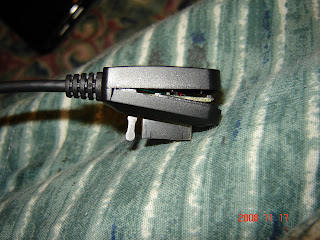
My dad noticed another big problem with my Archos shortly after I'd plugged it in; the USB cable was broken. The part of it that plugs into the Archos is open. It's very worrisome, and I know that even if a miracle happens, and I get everything to work before I bring it down to exchange it at Future Shop, I'll still need to exchange it because of that stupid cable. You can see what I mean in the pic below. It's not supposed to be like that.

The biggest problem though, is the unstable-ness of the device. I was innocently enough watching a movie on it this evening, while it was plugged into my computer, and all of a sudden it turned off. I hit the power button --> nothing. I tried holding it for 15 seconds to restart it --> nothing. I even tried the master reset on the bottom with a paperclip, and still nothing. Finally, just as I was going to write this blog, i tried charging it on my laptop, and when eventually the laptop saw the device, I tried the power button, and it came on... in troubleshooting mode. So I hit repair files, and it told me to install the new firmware... but wait, hadn't I already done that? NOPE. Let me just say, I'm very embarrassed for a supposed techie, and feel like a very big dolt. I downloaded the previous firmware, 1.0.87, not the newest, 1.1.01. I guess that the 87 caught my eye, and I figured it was the newest... it was the last on the list after all. Then the player installed the firmware, turned on, and viola! all of my files and settings were still there, and it worked! Yet still the internet would not connect, and now, while I was writing this blog, trying to connect to the internet, it did the "fatal turn-off" as I shall call it, and will not turn on. So this time, I'm just gonna leave it plugged in, and let it charge. I'd really like to try the wi-fi at school tomorrow, on an unsecured network, and see how/if that works. I'm also a little reluctant to return it right away (as in in the next 2-3 days, unless this "fatal turn-off" continues) because now that I've bought this Archos 5, the only one's that my local Future Shop has in stock are four of the 60 GB versions.

Now for the good features. I found the touchscreen to be absolutely delicious! It is very intuitive, and they keyboard works beautifully. The picture/video quality is also excellent. I watched some TV shows from my computer on there, and even my mom liked the video quality (she can't stand watching small screens like that normally). The transfer rate over the USB was fast enough, and I'm very happy that you can change the device to act as a hard drive, instead of a Windows Media Device, because I'd much rather drag-and-drop my files from my computer. It just took my a little while to figure out how to change that setting (Settings-->Info-->Storage). I also really like all of the pre-installed backgrounds, and I have no complaints about the sound quality, through my Skull Candy head phones, or even the built-in speaker (which isn't even stereo!), although I must say, I'm not that picky.

I'm optimistic about the Archos 5 still. On forum.archosfans.com, a fair amount of people really enjoy their products and haven't had any problems with them. Others have had great luck with replacements, and a select few have had no luck with multiple replacements. We'll see how it goes, and I'll give an update later on (hopefully at a better time, rather than 1 am on a school night).
--UPDATE--
I've returned my beloved (broken) Archos 5. Instead I paid about double the price and got a 320 GB HD, 4 GB RAM, HP Tablet Laptop, which will be written about in another post.
Ohh, and by the way... and I'm pretty surprised at this, they raised the price of the Archos 5's here in Canada (not sure about the USA... probably)! It's now at least $50 more for the 250 gig.

Sunday, November 02, 2008

More Geekiness!

Ever since I "discovered" the Archos 5 (pictured below with the battery dock), I've been completely obsessed. I've read oodles of reviews, and I've looked through all of the pages on the Archos website... heck, I even read a bit of the online manual! So, I've pretty much decided that I'm getting that darn IMT (internet media tablet) one way or another. During my readings though, I've seen a fair amount of bad things about the product, however most sites still rate it high. It seems that there are a lot of little problems that add up to devalue the IMT. It seems that some of these problems have been addressed in recent firmware updates though. However, I'm not very happy that the AC power adapter is an add-on that you need to buy separate from the player. I don't want to waste one of the three USB ports on my laptop to charge the IMT. I guess when I've saved up enough money, I'll just get the battery dock, so that I'll get a little extra battery power on the go, as well as an AC charger. I'll definitely write my own review of it on here whenever I do get it (hopefully before my flight to Florida for Christmas!)


Now onto another techie topic... One of the most used programs that I've downloaded for my computer is definitely my Google Desktop. Not only does it do an infinitely faster search for files on my computer than the one supplied by Microsoft (sorry cute lil' puppy), but it also has a great sidebar feature (same idea, but fairly different than the one found in Windows Vista). I've got a very handy clock at the top, my Google Calendar right there, where all of my scheduled events are only a roll-over away, a handy-dandy scratch pad where I can jot any notes that come to mind, or phone call messages when I don't have paper around, Web Clips from my favourite blogs (jewishatheist.blogspot.com and baconeatingatheistjew.blogspot.com being my main ones), a calculator gadget, because I'm sick of going through the start menu to get the calculator every time I want it (and it has a scientific mode... yay!), my wireless connection strength, and my battery power. I just don't know what I'd do without it (well actually I do, I'd be very sad, and inconvenienced).


I really love the Google Calendar. My only complaint is that you can't make different events different colours in one calendar, you have to make a new calendar to do that. So I've got a separate work calendar, for my work schedule (which I don't display on my sidebar calendar... it'd all be days with events!), and the automatic one I use for school and everything else. I love that you can choose to only view one calendar or another, or have them both, and how easy it is to add an event. And the repeating feature is even better than I'd hoped for. You can choose how things repeat, like every day, week, month, year, and then choose how often, like the event "pay day" repeats every 2 weeks. Another fun feature is adding pre-made calendars to your own. No need to worry about adding holidays yourself, there's national and religious calendars that you can add, among other calendars. You can choose to make your calendar public if you'd like, or make specific events public/private. You can even give permission to select Google Calendar users to layer your calendar with theirs by entering their e-mail addresses. This way friends or family members can co-ordinate events, and know each other's schedules. I suggest this to anyone who wants a calendar that they can access anywhere with an internet connection, and especially to those who use a Google Desktop sidebar (unfortunately, the Google Desktop widget is not available for Windows Vista sidebars).


One last subject... Halloween was yesterday, and even though I'm too old to go trick-or-treating, and had a midterm to write, I still dressed up. I was so excited about my costume. I decided to be Doctor Who! (the tenth Doctor, played by David Tennant, as seen above) I even wore a pair of Converse All Stars, although mine were blue, and the Doctor wears white ones.
Happy belated Halloween everyone... now prepare yourself to be bombarded with Christmas!

Monday, October 27, 2008

Titles and mp3 Players

Wow, I finally found out why I didn't have titles. That was really bothering me. So from now on, these posts will have proper titles.


And now, to let my true techie side come out *squee!* I'm just gonna babble a bit about some mp3 players. Let me start off with the fact that I am not a fan of iPods. I don't own one, I uninstalled iTunes, I'm just not a fan.

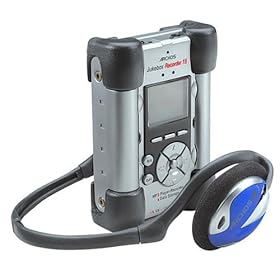
I had a 15 GB Archos Jukebox Recorder mp3 player before they even came out (it's a bit bigger than my Sony Cyber-Shot camera, and uses an obsolete double-ended male USB cord to connect to the computer; pictured above).

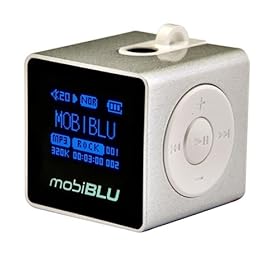
My other mp3 player is a bit newer; it's a 1 GB MobiBlu Cube (as pictured above, except mine is red). They're rather neat, they not only play mp3's, but they also have an FM tuner, and can record mp3's from it. They also have an OLED screen (organic light emitting diodes, for those who don't know all the jargon).

So I've got these two mp3 players. I don't really use them all that much anymore. I use them more on trips, or times when I can't have my laptop, or music playing out loud from my cell phone. But ever since the iPods and other mp3 players came out with photo viewing, and video playback, I've wanted a new one. And now the iPod Touch had really gotten my attention, with wi-fi capabilities. I'd be connected all the time! There are wireless networks at my dad's house, my mom's house, and school. So I headed over to my local Best Buy one day, and decided to check them out. While I was looking though the mp3 players, an Archos mp3 player caught my eye. It had a bigger screen than the iTouch (it was touch screen though too), it had the wi-fi, photo viewing, and video playback capabilities, and it was cheaper than the iTouch! But what really caught my attention was the fact that the $410 iTouch was only 32 GB, and the $350 Archos was 60 GB! Or you could get a 120 GB Archos for $400. That doesn't seem like much of a choice for me. I still haven't gotten a super-cool, uber mp3 player, but when I do, I'm pretty sure about which touch-screen, wi-fi capable player I'm not going with. I think I'll go with Archos; my old Jukebox Recorder has been very reliable, even after it's been dropped a few million times, with many bangs and dings in it.